VirtualBox Updates and Mac user reports
Latest VirtualBox Version: 7.0.16, April 16, 2024
Reports updated 5/20/2019
(Tip for VirtualBox problems with macOS Mojave)
This page is a catchall for info & feedback on freeware VM VirtualBox. (Free alternative to Parallels Desktop & VMware Fusion.)
Latest Version/Update: VirtualBox Version: 7.0.16, released April 16, 2024.
VirtualBox version 7.0.16 includes a macOS Host related fix:
- macOS Host: Fixed issue when App Nap was affecting VM performance (bug #18678) .
See the Change Log for other 7.0.16 fixes and improvements.
Previous version 7.0.14 included 2 macOS Host related fixes:
- macOS Host USB: Added support for newer storage devices.
- macOS Host: Fixed memory Leak in the VBoxIntNetSwitch process
when VM was configured to use 'Internal Networking' (bug #21752).
Previous version 7.0.12 included this macOS related fix:
- Networking: Fixed memory leaks in the VBoxIntNetSwitch process on macOS (bug #21752)
Previous version 7.0.10 includes these macOS related changes and fixes:
- VMM: Fixed sluggish performance starting with macOS Ventura 13.3 (bug #21563, bug #21596).
- MacOS Host and Guest: Introduced general improvements in the installer area
Previous version 7.0.8 included this fix for macOS Ventura:
- VMM: Fixed triple fault related guru meditations for UEFI guests starting with macOS Ventura 13.3 (bug #21563
A previous version 7.0.4 included 2 macOS related fixes:
- VMM: Fixed rare guru meditations with certain guests on macOS 10.15 (Catalina) (bug #21237)
- 3D: Fixed VM process crash on macOS with 3D enabled (bug #21232).
Previous version 7.0.2 listed these macOS related fixes and a known issue:
- Known issue: VMs having more than one vCPU configured will not work properly on macOS Catalina due to an unknown memory corruption issue. Either lower the number of vCPUs to 1 or upgrade to BigSur or later where the issue does not occur
- macOS hosts: Added workaround for a bug in the Hypervisor framework on Catalina causing VERR_NEM_MAP_PAGES_FAILED errors when starting a VM. (bug #21128)
- macOS hosts: Re-introduced support for internal networking, this is considered a bit experimental still
- macOS hosts: Fixed VM crash when the guest tries to access a microphone or webcam
Version 7.0.0 (released Oct. 10, 2022) was a major update, with a very long list of new features.
Here are the macOS related ones in version 7.0.0:
- macOS host: Dropped all kernel extensions. VirtualBox relies fully on the hypervisor and vmnet frameworks provided by Apple now. At the moment the implementation lacks "Internal Networking" functionality. This will be provided at a later date.
- macOS host: Providing a Developer Preview package for systems with an Apple silicon CPU. This is unsupported work in progress, and is known to have very modest performance.
- GUI: Improved theme support on all platforms. Linux and macOS use native engine...
A previous 6.1.34 update included 2 macOS related fixes:
- GUI: Improved GUI behavior on macOS Big Sur & later when kernel extensions are not loaded.
- MacOS host: Fix handling of non-ASCII characters in the guest control functionality (bug #20792).
The previous VirtualBox version 6.1.30 included these fixes for macOS:
- GUI: Fixed crash on macOS Big Sur while browsing for an external image from First Run wizard.
- VBoxHeadless: Fixed crash when running on macOS Monterey (bug #20636)
- macOS host: fix multiple bugs specific to macOS Monterey in installer and startup of kernel extensions.
- macOS host: show message indicating the unsupported CPU on M1 based Macs and abort installation.
A previous VirtualBox version 6.1.20 included this fix for macOS:
- Audio: Fixed detection of duplex audio devices on macOS.
(5.0 regression; bug #20171)
The macOS info below is from the VirtualBox 6.1.18 update:
- macOS host: Multiple optimizations for BigSur.
The 6.1.16 Update included these fixes for macOS Big Sur:
- GUI: Fixed some Qt related crashes on macOS Big Sur.
- macOS host: Installer on Big Sur is now reminding user that system has to be rebooted to load the installed KEXTs.
The 6.1.14 Update included these fixes for macOS Hosts:
- macOS host: Fixed webcam passthrough and audio input on Mojave & newer by requesting authorization from the user (bug #19758).
- macOS host: VBoxHeadless no longer able to start VMs (6.1.4/6.0.18 regression; bug #19706).
(Previous 6.x updates included a fix for VM crashes with macOS hosts, most visible on macOS Catalina.)
Past Mac/OS X Tips and User Reports on VirtualBox: (later first)
Tip for VirtualBox problems with macOS Mojave
Several users recently reported Mojave 10.14.5 update seemed to break Virtualbox. ("If uninstalled it will not install, if already installed will not execute after update (system extension blocked).") Some sent thanks for this earlier tip by "ryan" from the Virtualbox forums.
(Always have a current backup before doing system mods like this.)
"I was able to get the kernel extensions to load the KEXTs without user approval by adding the VirtualBox Apple Developer Team ID in spctl kext-consent.
I used the following command to get the Team ID:
codesign -dv --verbose=4 /Applications/VirtualBox.app
(Result) TeamIdentifier=VB5E2TV963
(The team ID is used in step 7 below.)
- Turn on your Mac, then immediately press and hold Command-R to start up from macOS Recovery.
- Select Disk Utility from the Utilities window, then click Continue.
- From the Disk Utility sidebar, select the volume that you're using, then choose File > Mount from the menu bar. (If the volume is already mounted, this option is dimmed.)
- Then enter your administrator password when prompted.
- Quit Disk Utility.
- Choose Terminal from the Utilities menu in the menu bar.
- Type the command: spctl kext-consent add VB5E2TV963
- When done, choose Apple menu > Restart."
Mac User Problem Report with VirtualBox 5.1.14 (Updated with later reply)
(from 3/08/2017 - updated 3/9 with reply on v5.1.16)
Virtualbox problem after 5.1.14 update (Mac OS Sierra host)
In a desperate search to find out why I suddenly can no longer submit class assignments done in Virtualbox, I came across your page asking about experiences with Virtualbox.
At the beginning of the semester the most current version of Virtualbox was 5.1.12. I use a MacBook Pro (mid-2015 model) and Mac OS Sierra, and the virtual machine I set up for my class is Linux Fedora 64 bit.
The first thing that happened was that I could not submit my assignments from Virtualbox for grade, or even attach them to an email. My instructor had me enable sharing and drag and drop, which I did choosing the bidirectional option. I still couldn't submit or attach my assignments until I finally found a page that said, despite what I kept reading elsewhere, that enabling sharing and drag and drop weren't enough; I needed to simply go to the virtual machine window and use the Insert Guest Additions option on the devices menu. Everything worked like a dream, and I was really pleased.
Now suddenly I have Virtualbox 5.1.14 and I can no longer submit my class assignments or attach files because I can't get them off my virtual machine anymore. Apparently when Virtualbox updated, it did NOT update Virtualbox Guest Services. I finally found where I could get the 5.1.14 .iso file and pulled it in, moved it to the same location as the old .iso file. I repeated everything I did when I had 5.1.12 to enable VB Guest Services for the 5.1.14 version and guest services won't even mount.
I am dead in the water for my class using Virtualbox. I can no longer number how many different ways I searched the internet for a solution to my problem. Most of the internet searches for issue-solution reports, actually all of them, are old posts (with the latest date for an issue report being August of last year). I don't know what, if anything, I did wrong when I tried to update guest additions and I can't find a current post that gives me step-by-step instructions telling me what I need to do, which has me feeling like it's something I did or didn't do because I would have thought I'd have found current issue reports from Mac users. Even so, I thought I'd email you with my experience anyway.
(Can you try VirtualBox 5.1.16 update released March 8th to see if it helps? (It lists some Linux fixes.)
If not there's a VirtualBox on Mac OS Hosts Forum that may be of some help (posting the problem there). If v5.1.16 doesn't help is it possible to roll back to 5.1.12?)
I ended up doing the Mac equivalent of uninstalling Virtualbox. I then went to download Virtualbox again and found the new version. I downloaded 5.1.16 (why do they seem to always skip a number between versions?) and the extension pack and installed them. I couldn't find a 5.1.16 guest additions ISO, but when I went in to my virtual machine, there was an icon for it. I mounted it, then restarted my virtual machine. That seems to have done the trick (at least drag and drop works, for some reason even though I have bidirectional set for it, I couldn't copy and paste). I will just get used to drag and drop I guess, even though I am a copy and paste person rather than a drag and drop person. All that matters to me right now is that I am able to get the files off my virtual machine so that I can submit them for grade.
Thank you so much for your reply and for posting my story! I really appreciate it.
Sincerely, Beth"
Thanks for the follow-up Beth. (Later VirtualBox updates have been released since this report.)
VirtualBox 5.0, running Windows 7 Pro on MacBook Air (OS X 10.10.3) Report:
(from 08/06/2015)
I installed VirtualBox 5.0 on a MacBook Air, 2GHz Intel Core i7, 8GB RAM, Mac OS 10.10.3.
(Did you have problems with OS X 10.10.4 update? (OS X 10.10.5 was released 8/13/2015, including security fixes.)
Installation of Windows 7 Pro without any problems.
I experienced a number of problems with applications. For example, I tried to install software to run a program created by a colleague - this software downloaded and installed in under 30 seconds on several other Windows units, including a Lenovo PC and an old iMac with similar OS running VMWare Fusion 7. The background applications took almost an hour to install; Windows crashed Xs 1, and I could never get the program to work. In addition, I tried running Windows Update and that program stayed active on the screen for up to an hour, with no visible activity (downloads).
I would like to use VirtualBox, but might need to try VMWare Fusion, Parallels or Boot Camp instead.
Thanks for any suggestions.
-Ed M."
Was going to ask about network config/memory allocated and checking the Vbox forums (not running v5 myself) but have you tried the VirtualBox 5.0.6 update? (2nd update since 5.0) They also updated v4.3 (4.3.30) in July, but not sure if you want to try another version install.
If you try VirtualBox 5.0.6 (or 4.3.30) (with or without OS X 10.10.5 update), let me know if it helps. (Delta and Combo updaters posted in the Aug 13th news and of course I'm sure you have a current TM backup and preferably a volume clone before OS updates.)
VirtualBox user Report on OS X 10.9/Mavericks Upgrade (errors fixed w/HD File Type Change):
(added 12/24/2013, from 12/20 mail)
"I was running VirtualBox 4.2.16 on Mac OS X 10.8.5; this was running OK but due to the disk space I allocated when I setup the virtual machine first of all I decided that when I upgraded the O/S to Mavericks 10.9.1, I would upgrade the virtual machine also. VirtualBox 4.2.16 said that the current version of the o/s was illegal, even when I took the virtual machine out of the domain and put it back in.
I removed the virtual machine that was on my machine and after upgrading the operating system (OS X 10.9.1), I upgraded VirtualBox to 4.3.16. However on setting up a new W7 virtual machine, Windows Boot Manager reports Status '0xc000035a' - "Attempting to load a 64 bit application, however this CPU is not compatible with 64-bit mode." This I find very hard to believe as a W7 operating system virtual machine has been running on the same hardware for approximately 10 months.
I am running Mavericks on a 24" iMac with 4GB RAM and a 2.8GHz Intel Core 2 Duo processor. I would much appreciate any help / advice.
(appx 1 hour later he wrote with a fix)
Fixed.
The initial error was due to the Oracle VM Virtual Software choosing the operating system and it choosing Windows 7 and not Windows 7 (64-bit), this got me past the 0xc000035a error. This only provided me with a 0xc0000225 error which was resolved with modifying the Hard Drive File Type from VDI (VirtualBox Disk Image) to VHD (Virtual Hard Disk).
Although I did not get any correspondence from you, thanks as typing out the problem helped me look in detail with the setup and therefore resolve the problems encountered.
-Ryan D."
Glad it's working Ryan and thanks for the quick follow-up. (I recd both mails at the same time.)
VirtualBox on OS X 10.9 Host running Windows 8.1 for Quickbooks use:
(added 11/25/2013)
"I am using Macbook Air with OS X 10.9 that I bought about 7 weeks ago and I downloaded VirtualBox (v4.3.2 at that time) earlier this week and then added Windows 8.1 using the full version that I bought at Staples. The reason I wanted to do this is so I can run the windows version of QuickBooks on my mac, which I use at work.
Not being a computer whiz, it took me a long time and I had to do a lot of research to figure it out because of the difficulty in obtaining Windows 8.1 OS, I telephoned Microsoft, Apple, QuickBooks and I finally went back to Staples and the computer dude helped me there. VirtualBox wasn't the issue it was understanding how to get the QuickBooks file from the disk to my laptop in a bootable form. Used the SuperDrive under Disk Utiltiy to create a cdf file which we put on the desktop and proceeded from there.
It is running great and I am glad the experience is finally over!
-Paula B."
Thanks for the note Paula and glad it's working.
(added 4/15/2013 - in reply to report below on problems w/SLS 10.6.3 guest)
Tried installing Snow Leopard Server (10.6.3) in VirtualBox (v4.2.12 at that time) with no success.
Suggest trying later version.
(Here's the (1.18GB) OS X 10.6.8 Server Combo updater v1.1 D/L page. I've not used VB, so not sure about applying the Combo updater on its guest installs.-M.)
Snow Leopard Server 10.6.3 installs OK in Parallels 8.
-Wil"
(added 4/12/2013)
"Snow Leopard Server install on Virtualbox (request for help)
Currently I am using VirtualBox 4.2.10 on a mac mini (Intel 2.3GHz quad-core i7 with Mountain Lion) and have windows XP installed as a guest for use of quickbooks and quicken. It works great, very fast.
Now trying to install mac OS X 10.6.3 snow leopard server as guest on VB for the use of Canvas X. It gets to the black screen showing text, many dots, and ends with "....unknown4 of getvar called", I cannot get any further.
(did you remove the OS X server install disc from VBox settings (Storage) after installation?)
Any direction or help on installing Snow Leopard Server on VB in OS X MT Lion would be great!
Thank you, David"
Just after posting this Friday, VirtualBox v4.2.12 was released. Not sure it will matter but if it does, send a note.)
(A later reply above indicated 4.2.12 didn't help.)
If any readers have run OS X 10.6.x Server/Rosetta apps under VirtualBox (OS X 10.8.x host) and/or have a tip for Dave, let me know via news at xlr8yourmac.com. TIA. (Found the section in VBox's manual on Mac OS X guests and an article from 2010 on running Snow Leopard Server under VirtualBox 3.2 but has anyone done this with VB 4.x on OS X 10.8.x host?)
BTW: I found a similar problem report in VirtualBox's OS X Server Guests forum. A thread dated Mar 30, 2013 titled Mac OS X 10.6 server on 10.8 with VirtualBox 4.2.10?, but no fix posted as of 4/12/2013. Here's a clip:
"Mac OS X 10.6 server on 10.8 with VirtualBox 4.2.10?
First vbox showed me a black screen. I increased video memory to 128MB, so now kernel loads, but ends at "AppleIntelCPUPowerManagementClient:ready" I've used the MacosX 64bit settings, given vbox 1 CPU and 8GB RAM.
Are there other settings I should tweak?
Did anybody succeed doing this?"
As of April 13th, no progress posted there. Posts were before 4.2.12 was released and didn't see any followup yet.
(Canvas X (Mac OS) lists a PowerPC CPU as required so you have to install Rosetta. It's an optional install for 10.6.x, the last OS X version to support Rosetta emulator for PowerPC app support. HT3877 Apple doc on OS X Server v10.6 and Rosetta (no longer online) had a terminal command to install Rosetta.)
(added 6/18/2012, from 6/11 mail)
"VirtualBox 4.x report
I use VirtualBox (version?) on one of my Lion machines to run a Snow Leopard VM. I also went ahead and put a Windows 7 VM on there as well. I use Fusion and Parallels on various other machines.
From a performance standpoint I find them all to run fairly well. I can only compare the speeds of Windows 7 since I can only run the Snow Leopard VM under VirtualBox. I do not do anything processor-intensive in the Windows VMs though. The Snow Leopard VirtualBox image takes a while to come back from a suspended state. My Windows VM will generally take 5-10 seconds to resume, and the Snow Leopard VM can take closer to 20-30 seconds.
I keep the Snow Leopard VM around for a couple of speciality Rosetta apps. The speed is acceptable with 8 gigs in my early 2011 15" MBP. For a while I ran it with 4GB of RAM and the speed was unacceptable. I find Fusion and Parallels to run better in lower-memory environments, but that could just be that the Windows 7 VM handles low memory situations better.
USB works fine once VirtualBox's extension pack is installed. I use bridged networking in all of my virtual machines since I find it more reliable.
Fusion and Parallels are definitely more user-friendly. Setup and configuration in those two programs has gotten about as easy as it could be. VirtualBox still requires a bit of documentation scouring. Parallels and Fusion also make things like folder and printer sharing a bit easier as well.
In general I find VirtualBox to be a great example of well done GPL software. For power users there is little reason to spend the money on Fusion or Parallels. For regular users, though, Parallels and Fusion are so inexpensive that there is no reason to not purchase the apps.
-Hank"
Problems w/4.1.16: (first report on v4.1.16)
(added 6/11/2012)
"I've tried my dangdest to get it working, installed a fully legit copy of W7 Ultimate 3 times now, still get this:
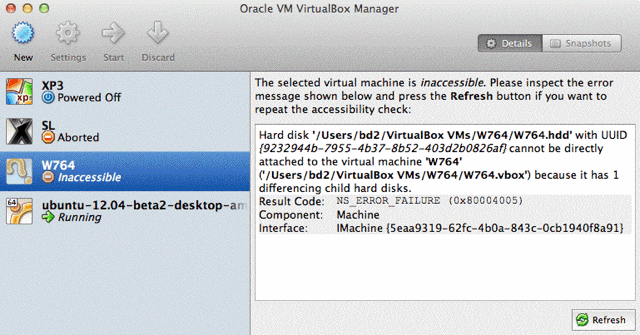
Tried a couple of Linux distroes also, same result on all, apparently works & even connects to the Internet on first instance, after that either no connection or worse, no VM!??
Even XP3 doesn't work. :(
In Past versions of OSX and past versions of VirtualBox, these things worked. No idea where the problem is.
System Info:
OS X 10.7.4 Build 11E53
Model Identifier: iMac7,1 w/2.4GHz Core2Duo (4MB L2), 6GB RAM
Boot ROM Version: IM71.007A.B03
SMC Version (system): 1.21f4
Looked up that error (Virtualbox - 1 differencing child hard disks) but it didn't help - said Solution is to delete the virtual machine (but not the hard disk!) and then recreate the machine using the hard disk didn't work here...
Virtualbox - 1 differencing child hard disks
Posted on November 7, 2009 by Matt
If you're getting an error along the lines of "{hard disk} cannot be directly attached to the virtual machine because it has 1 differencing child hard disks"
Then the solution is to delete the virtual machine (but not the hard disk!) and then recreate the machine using the hard disk.
http://that-matt.com/2009/11/virtualbox-1-differencing-child-hard-disks/
Using the setting to use an exiting VDD doesn't show W764 as an option, even though it exists...
/Users/bd2/VirtualBox VMs/W764/W764.hdd
As well as my 1st attempt doesn't show but exists...
/Users/bd2/VirtualBox VMs/Win7/Win7.hdd
So I try to create a new one & get this error that it already exists...
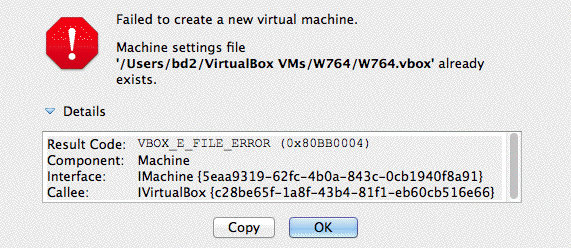
I've checked the Disk & all Permissions, but no soap.
-BDAqua"
If any reader has a tip/suggestion send a note. Thanks. (I've only used bootcamp drives/partitions and not VM.)
Update: On June 20th, VBox 4.1.18 was released. I wrote BDAqua to ask if he'd tried that update.
(added 2/13/2012)
"Previously, I wrote on installing Snow Leopard in VirtualBox and getting USB drives to function via the rear most USB port on a MacBook Pro and enabling file sharing by the implementation of file sharing on both the Mac and MacOS in VirtualBox. I have now figured out how to enable printing (sort of) and solved the permanent implementation of a larger screen resolution. I was unable to figure out how to enable a larger screen resolution via VBoxManage when running the OS 10.6 on an EFI boot loader in VBox on Mac OS Lion.
To enable printing one can use the data on this link (Printing from within a WinXP Virtualbox client with a Mac OSx host) to enable printer sharing on both the Mac and in VBox, Step 4 in not applicable, I am using the Bridged setting in VBox. Both the Mac and VBox OS have to have the appropriate printer drivers for your printer installed. With VBox enabled, but the MacOS not running plug the printer into the rear most port on the MacBook and enable the printer in the VBox Settings pane using the + icon on the right hand side of the pane and then verify that the printer shows up in the Printer pane of System Preferences on both the Mac and in VBox. As for the printing part it sort of goes this way. With the printer plugged into the rear USB port on the MacBook you can print from VBox when the print command is executed the normal dialog boxes show up and one clicks on the Print button, but nothing will be printed, the printer icon will show up in the doc with a yellow dot indicating a problem. Upon quitting VBox the printer will be released to the Mac and the document(s) will print. For text documents maybe easier to print by dragging and drop to the Mac side via the shared computer shown in the Finder sidebar or simply mailing the document to yourself to be downloaded and printed later.
To enable a larger screen resolution in VBox implement the following: When starting up VBox, interrupt the boot process at the EFI boot screen by tapping the space bar, wait a couple of seconds, and type the following into the test/dialog box that appears on the center of the screen: "Graphics Mode"="1280x1024x32" and be sure to include all the quotes! Tap the space bar to continue to booting. As the MacOS boots it should exhibit the larger screen resolution upon the appearance of the gray Apple Log on the Mac boot screen.
With all this accomplish due to the lack of Guest Additions in VBox for the MacOS there are still some oddities that show up that differ from a similar installation in VBox in a Windows Vista OS such as Finder drop down menus that are not persistent in that when accessing you have to hold down on the trackpad after clicking on the menu bar item and a new Finder Window does not come up with Command N.
After getting all of the above to work the settings can be retained by using the "Save machine state" when shutting down VBox.
Regards, Wil N."
VirtualBox v4.1.6 on OS X Lion, running OS X 10.6.x in VM:
(added 11/28/2011)
"Virtual Box 4.1.6 on Lion running Snow Leopard in VM
Snow Leopard works OK in Virtual Box 4.1.6 with some minor oddities such as "About this Mac" not being available. The VM merely restarts. There may be other oddities but I am not aware of them.
Figured out how to get USB stick recognized without Guest Additions as Additions cannot be installed for the Mac OS.
- Before starting SL in the VM go to VM Settings/Port, insert desired USB stick in rear USB port on MacBook Pro (I think this maybe the same USB bus the the keyboard uses), and click the + sign on the right so that the USB stick is listed, unplug the USB stick.
- Start the SL VM and after the desktop comes up, insert the USB stick in the rear usb port. If you get a small white button with an orange dot in it in the USB icon at the bottom right hand corner of the Virtual Box window it will mount.
- If it does not mount click the USB icon in the Virtual Box Window to see that the USB stick is checked and the name of the stick is NOT grayed out. If it is grayed out remove the usb stick, quit SL and Start the SL VM again. Try again to see if the USB stick is recognized.
To get a screen resolution other than the default use the information provided for Method 1 in this link. PCWiz Computer - [Mac OSx86] How To Change Resolution (VMware) I tried the second Method altering the .plist but could not get it to work. Method 1 has to be entered at the boot prompt at every launch.
(FYI: See report below on changing rez per info in VBox user manual section 3.12.1
Wil later wrote so far he's not been able to get that to work.)
I used Snow Leopard in VirtualBox to run Quicken 2006 rather than run between computers. I wish Intuit/Quicken would come up with a release that has the attributes of Quicken 2006 that will run in Lion. Quicken Essentials is nice but does not have the reports showing both income and expense (debit and credits) in one report that can list up to a full year in a single window.
I currently run Windows Quicken 2009 in CrossOver (wine) but continue to keep Quicken 2006 going in the hopes that soon Intuit will release an acceptable version of Quicken for Lion.
Regards, Wil N."
Another VBox user mail today with info on changing resolution in VM:
(added 11/28/2011)
"I am running VirtualBox 4.1.6 (virtualized 10.6.8) on my Mac Pro (host 10.6.8). I was able to change the virtualized screen resolution by following the instructions in the user's manual section 3.12.1, "Video modes in EFI". For example, by typing in the command "VBoxManage setextradata "VM name" VBoxInternal2/EfiGopMode 4" in the host Mac OS terminal application, the next time I booted I had a virtual screen resolution of 1440x900. This setting persists until changed.
Besides having to use a USB drive (as mentioned in report above) to transfer files between host and virtualized machines, this runs pretty well for my limited needs (primarily Canvas) once I upgrade to Lion.
-Ted M."
Virtualbox 4.1 running under OS X Lion w/2011 Mac:
(added 8/01/2011)
"After picking up a new Macbook Air 13" 1.8 GHz Core i7, 4GB/256GB earlier this week, I got around to setting up a a new WinXP VM in VirtualBox 4.1.
Fresh XP installation was fast (from .iso on the SSD), applying the last two years of updates and installing the few programs I need was quite fast and painless.
My 2.4 GHz 15" Santa Rosa MBP (6GB/500GB) always chokes the system when doing heavy disk I/O in the (Parallels) virtual machine. My new air easily multitasked during the XP install/updates/application installs -- I'm very impressed with the SSD.
~ashes"
(added 7/29/2011)
"I have a 2011 MacBook Pro 13" 2.3Ghz i5 with 8GB memory (320 GB HDD) running 10.6.8 and (in a separate test partition) Lion 10.7. I have a need to run WinXP for configuring network devices and telephone systems, and have used (prior to the 2011 MBP 13) VM Ware, but decided to go with VirtualBox (which I have used for quite some time on my desktop system for software testing) instead of upgrading VM Ware.
I have been running VirtualBox 4.0 since purchasing the MacBook Pro 13in in March under 10.6 and have tested VB 4.0 under Lion with no issues. This morning I upgraded both the Snow Leopard and Lion versions to VB 4.1 with no issues.
VirtualBox on the 2011 MacBook Pro 13in has been a very good performer (actually faster than native Windows XP on my wife's 3 year old ThinkPad).
I would not hesitate to recommend VirtualBox running on a 2011 MacBook Pro 13" laptop.
-Fred K."
(added 7/29/2011)
"I have been using VirtualBox 4.1 on a mid 2011 MacBook Air 13in 1.8Ghz i7. I copied the VMs from a Windows machine and for the past week I have not had any issue with any of the VMs I have (Win7, Win2003-64bit, OpenSuse). And I do database design and Business Intelligence work on the VMs daily.
The only thing that may come up is the fan getting really loud when I started Oracle on one of the VMs. SQL Server does not seem to cause that.
Hope that will be useful to you and let me know of you have any questions or something I can test for you.
-Serigne"
(Older reports on VirtualBox follow)
(added 12/29/2010)
"Upgraded my long trusted Win XP from VirtualBox 3.xx to V4.0
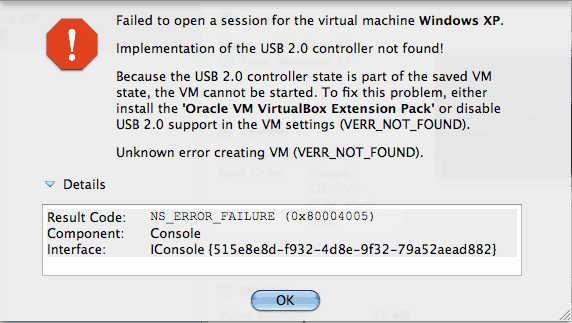
Fixed it with the suggested package from download site...
Works like a charm, but I do still miss the "drag and drop" copy option of files, that both VM Ware Fusion and Parallels have!
I have heard that VirtualBox is slower then the others, but I never noticed that.... I am not a heavy app user, just do some online stuff which macosx wont let me.
The new version seems much less CPU intensive - my cpu temp is 59C, earlier I had temps around 65C.
Nice update!
-MacDoktor"
(added 12/27/2010)
"VirtualBox 4.0 is a big improvement! The extra's pack provides USB 2.0 support and provides for automatic recognition with just a simple one click to add any device in the USB Settings folder.
Version 4.0 has improved the installation of Guest Additions in Linux without the need to use the Terminal.
I mainly use VBox as a hobby, trying various OS's. I have used Parallel's through 4.0 (not v5 or v6) and while it has some enhancements over VirtualBox, VirtualBox is free and is sufficient for my purposes.
Regards, Wil N."
VirtualBox 3.x Feedback:
(added Sept. 25th, 2009)
"I've got 3.0.6 installed on my (2009) Nehalem Mac Pro, and I have been unable to install CentOS 5.3 (64-bit) so far. It gets through all the initial install steps, then hangs at random places during the actual install. I'm installing from an ISO image, the same one I used to do VMWare installs.
It's odd, I can't seem to determine a pattern for the failure, it's always at a different point in the install.
(Just for the record I asked what OS X version he's running and if he'd reported the problem to VBox's developers)
10.5.8. I've had issues with 10.6 on my Pro at home, so I've decreed a very slow rollout at work. (Never mind that a number of the special-purpose apps. we use don't support it yet.)
Not yet (reported this to VBox). I'm just getting started with VB. I've done a good amount with VMs, going back to SunPC 1.0 in 1990 or so, and lots of different stuff since on both UNIX and MacOS/OS X with and without coprocessors. I did the early betas of both Parallels and Fusion, and am pretty much a Fusion user now, tho on UNIX I use Xen for hosting. In the case of Virtual Box, I got interested when Sun bought it (I worked for Sun years ago), and decided the other day to try it in our work environment. If I can ever get CentOS loaded, I want to go head-to-head with Fusion on the same machine - maybe Parallels as well, though in my mind the latter is only really good at Windows.
I'll look up the feedback info today if I get a chance and drop them full details, I'm happy to help out. Virtualization has always appealed to me.
-Pete W."
If anyone has a suggestion/tip (or sees the same problem) send a note.
(added Sept. 24th, 2009)
"Reinstalled VirtualBox 3.0.6 on MacBook2,1 (late 2006), 1.83GHz, 4GB ram running OS X 10.6.1 and 128GB Crucial SSD (Firmware 1571). Tried to reinstall Parallels 4.0 upgrade but it does not recognize previously 3.0 upgrade code and 2.5 full install code. Checked their web site for additional info but was following correct procedures.
Actually, after install Windows XP SP2 and observing performance I see no reason to go back to Parallels. I do have Windows on Boot Camp but performance increases with SSD now seem to make the Boot Camp partition unnecessary for my needs.
Regards, Wil N."
For me personally, the only reason I boot to Windows (bootcamp/separate HD install) is for 3D/gaming - and even a fast drive wouldn't make VM a good choice for that.
(added Sept. 21st, 2009)
"Setup: VirtualBox 3.0.6 installed on an iMac 2.4 GHz (2007 model, 4GB RAM) under 10.6.1 and 10.5.8 (the former on the internal drive, the latter on an external FireWire drive).
No problems here with various flavors of Linuxen (Ubuntu, CentOS, Fedora). VMs are generally set up with 1GB RAM and single processor.
1. In response to Lawrence B. (ref: earlier report below) and adding the Guest Additions to Fedora:
In a fresh, standard installation of Fedora 11, the guest additions require the installation of the compiler and kernel headers, like so (in a Terminal window, with the guest additions CD mounted using the menu item):
(The part starting with "#" are comments and don't need to be typed in.)
su - root
yum install dkms # install this package per VirtualBox instructions
yum install gcc # guest additions need compiler and kernel headers
cd /media/VBOXADDITIONS_3.0.6_52128
sh ./VBoxLinuxAdditions-x86.run # or -amd64.run for 64-bit installations
shutdown -r now # restart to activate guest additions
At least in my 64-bit virtual machine, this enabled the guest additions.
2. In response to Peter G. (earlier post below) and networking virtual machines:
The network adapter is set to NAT by default, so VirtualBox acts like a router and hides all virtual machines from the surrounding network, including the host machine. By changing the network adapter to a bridged adapter, the networking interface of the virtual machine uses the host's networking interface and talks to that network directly, e.g. it will contact that network's DHCP server for an address. In Peter's home network, the virtual machine would now get an address in the 192.168.0.x range, and other machines on that network could now access the virtual machine and any services running on it. (This may be easier than setting up port forwarding on VirtualBox.)
Chapter 6 in the user manual describes virtual networking in more detail.
Hope this helps,
Tilmann"
(added Sept. 21st, 2009)
"The one feature I want to use that VB doesn't support is running Mac OS X Server in a VB window. It would be nice to be able to test on 3 or 4 different MOSX server versions in place of having to BUY dedicated hardware to do this and still have to re-install constantly.
I've used both parallels and fusion to do this in the past.
-troy"
(added Sept. 18th, 2009)
"Re: VirtualBox 3.0.6
I too installed VirtualBox on my MacBook Pro 13" (4GB RAM, 500 GB Seagate drive from OWC). Windows XP Pro installed fine. I tried to clone a FreeBSD 6.2 server I have, and the level 0 dumps worked fine for the "/" "/tmp" and "/var" partitions, but every time I tried to restore the dump onto the virtualbox machine for "/usr", the OS would fault and the virtualbox would restart. Haven't had time to figure out what is wrong yet.
I'm using a command similar to the following:
ssh BoxWithBackupsOn cat /path/to/backup | zcat | restore -rf -
Anyway, life with Windows XP on virtualbox is pretty good,
Life with FreeBSD is providing a somewhat rocky start.
I have had no issues with the network connection running XP or FreeBSD.
It's a little weird because I'm on a 192.168.0.x network at home, so VB esentially creates a sub-network in the 10.0.0.x range. So it's a 10. routed to a 192.168. routed to the internet. I haven't tried attempting to use the VB client OS as a server and trying to access it from a different machine on my network.
-Peter G."
(added Sept. 14th, 2009, updated Sept. 21st for SL 64Bit Kernel Note)
"Re: VirtualBox 3.0.6
Mac Pro Early 2009 (4,1), 2.66 GHz, Quad Core with 4GB RAM
Using VirtualBox 3.0.4 and now 3.0.6
All device volumes on secondary drive
App running from primary/boot drive
Successfully booting and running:
Windows XP Pro
Fedora
Ubuntu
Xubuntu
DSL
Have been unable to add "VB Guest Additions" to Fedora device, all others OK. (Update/FYI - see reader's tips above) Able to run full screen or windowed. Boot times are fast and performance is stable.
For all setups I have granted 1024 MB of RAM and 128 MB of VRAM.
Have had 3 VirtualBox's running simultaneously with minimal impact on MacPro performance.
(What OS X version is the Mac Pro using? (10.5.x or 10.6.1)-Mike)
OS X 10.6.1 currently, initial set up was under 10.5.8.
(I asked if he had seen any problems using his internet connection in VM/Windows (which some VB 2.x users had reported earlier).)
I have noticed no internet problems so far - browsing is quick, automatically downloading and installing MS updates as scheduled.
My first version was 3.0.4, upgraded to 3.0.6 with SL - I was experiencing the password/authentication prompts reported by others.
(I was curious if VB had 64bit kernel support.-Mike)
Have not tried it yet - but if I do I will update. I have found that 64 bit breaks my current version of Cisco VPN - so for now staying on 32 bit.
(Update - he later wrote)
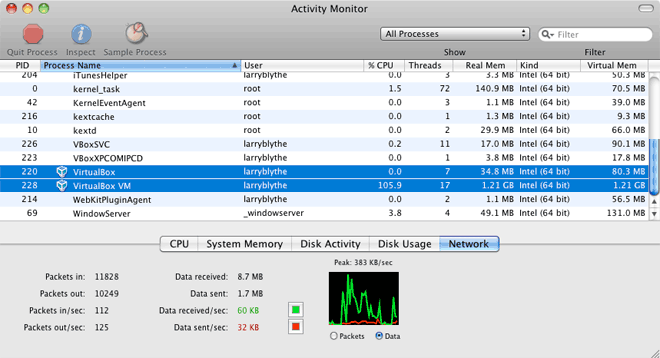
Ran VirtualBox in 64 bit. Image attached shows 64 bit VB?
-Lawrence B."
(screenshot from Activity Monitor, scaled/cropped to save space here)
VirtualBox 2.2.4 Feedback:
(added June 2, 2009)
"Quick note on VBox (2.2.4) on a 2007 MacBook Pro - this still does not support the internal microphone in Win XP guests. I actually am pretty impressed with VB, but I have to run VoIP apps under Windows and don't have an amplified external mic or USB mic, so no VBox for me.
The internal mic works fine in either Parallels or Fusion.
This deficiency has also been present for at least two years, so I would assume it will never be implemented.
-fb"
FYI - Reports below were using VirtualBox versions 2.2.2 or earlier
(added May 8, 2009)
"I have used VirtualBox and have been pleased. I have previously used Parallels v1, 2, 3 and VMware Fusion 1 and 2.
I primarily use VirtualBox for MS Access at work. The speed is nice and comparable to VMware Fusion 2. The feature I like the best is the ability to PXE boot. I haven't had success trying that with Parallels or VMware Fusion.
I work for a liberal arts college and we do all of our Windows imaging through Zenworks via PXE boot. When people first started switching from Windows to Mac at work they would use Bootcamp. Some to run Windows for certain applications they didn't want to replace due to price, others just to have a security blanket in case they couldn't figure out how to do something form OS X. (the main reason I run windows is gaming, and use bootcamp/Native boot for max performance in 3D games.)
Just like everyone else, they would tire of rebooting for one or two apps. So we started deploying Parallels. Both Parallels and Bootcamp required I recreate our Windows images from scratch. Eventually VMWare Fusion came out around the same timeframe as Parallels 3 was out and we were having tons of speed, USB, and stability issues with Parallels. So we switched to VMWare Fusion. For Fusion users I would use Vmware Workstation for Windows (free) to PXE boot and create a Windows VM with our Windows image. I would then copy that VM from the Windows machine to a Mac and open with Fusion and install VMWare tools. This worked pretty well with good speed and stability.
I was happy with this when I read a press release on Sun Virtual Box. The only reason I gave it a shot is that it claimed to support PXE booting on the Mac. I had low expectations being a free product but it has worked well. I now can bring a Windows image down to a Virtual Box VM on the Mac via PXE which saves me a lot of time and trouble deploying Windows on Macs.
I hope this helps.
Thanks, Mike F."
(added May 8, 2009)
"I used to use Virtual Box for a Windows 2003 (Ser ver?-Mike) environment which I use to develop on Visual Studio 2005. I had to move to Parallels as I found an issue with Virtual box.
I VPN to my office via a PPTP connection. I use the Bridged Networking as the NAT won't allow me to connect to the VPN server (Multiple layers of NAT) However, Since I am hosting this all on my Macbook it is going across my Airport card to my Airport Extreme. When I connect to the VPN after a short while the airport card will stop working and I need to reconnect to the AP. (What version of VirtualBox were you using? (latest is 2.2.2, released last week IIRC)-Mike)
Parallels works no problem with bridged Networking.
I do continue to use Virtual Box for Linux guests though as Parallels tools for Linux suck and have not been updated to work with the latest ubuntu.
(he later wrote)
It is Windows Server 2003 Enterprise. I use it as the application I do development on uses an SQL 2005 Database. It is just a pain to set that up in XP and Server 2003 performs very well in a Virtual machine as it doesn't have all the gui stuff that XP has.
So I started with Virtual Box 1.4 and the issue was still in the last update before 2.2.2. I love Virtualbox but since I need to be connected to the VPN 100% of the time so I have access to our Repository at the office, it was a show stopper. I continue to use virtualbox for Linux guests and the latest version now supports compviz in ubuntu so I get all the cool eye candy ;)
Best regards,
The Main Family"
If anyone else has seen this problem with VirtualBox or has a suggestion, let me know.
(I share internet access using an 802.11N Airport Extreme base bridged to a DSL modem with both Macs and PCs - although I use bootcamp/native Windows, not a VM.)
(May 7, 2009)
"I use VirtualBox at work extensively. It pretty much has feature parity with Parallels and is free. It offers the same Windowing modes including coherence (where the start menu and Windows Apps integrate into the UI with Mac apps).
Things like shared folders are almost as easy as with Parallels, which has a slight edge since it installs a driver that sets up the Mac as it's own Workgroup that's visible only to the virtualized PC. Unless I'm mistaken, Virtual Box lacks user folder sharing (very handy for having iTunes on both and using the same exact Library) as well.
Overall, If I didn't already own a copy of Parallels I would be using Virtualbox at home as well.
-Max"
(May 7, 2009)
"After a debacle trying to upgrade from Parallels 3 to v4, I deleted them all and started over with VirtualBox.
It is free, of course, so my expectations were lowered some. But it does pretty much all parallels does, and not so invasive with your system. Just installed the new Win7RC, it works well.
You'd be hard-pressed to come up with a reason not to use it! :)
Best, Gunnar"
(May 7, 2009)
"VirtualBox is great. I've used it for testing Linux, Solaris and other OS configurations. The best part is the FREE part. Hopefully the Sun/Oracle deal won't destroy VirtualBox and it's FREEness.
-Rob D."
(May 7, 2009)
"
In addition to Parallels I have used VirtualBox and find it to be a very good VM machine. My main use was for the Linux distribution Ubuntu. It is rather "geeky" in that you must learn to use some command line stuff like changing directories such as cd /cdrom to access "additions" for installing additional functions. There is a lot of support stuff out in the "cloud" via "googling" or "yahooing" some of which is quite detailed and some rather simple even on the same subject. I tend to use the simpler methods due to my limited linux command line capabilities. The best part is that it is free and very stable.
Regards, Wil N."
| 