Mac Pro FB-Dimm Pairing Guide/Tests (w/mixed 1GB, 2GB and 4GB pairs)
Posted: Nov. 18th, 2009
Many times over the years I've had (2006-2008) Mac Pro owners write their new FBDimms were not recognized properly. Other than some rare cases of bad FB-dimms, usually the problem was the FB-Dimms were not Paired properly (1st thing to check) and/or not fully seated (dimm or riser card). Carefully read the info/examples (Color coded) in these Apple PDF guides on 2008 (800MHz FB-Dimms) and 2006-2007 (667MHz FB-Dimms) Mac Pro memory installation, and one on FB-DIMM Mac Pro RAM Pairing for best performance.
(The 2009 and Later-Mac Pros do not use FB-Dimms. For links to other Apple DIY guides for 2009 Mac Pros, pix of internals, (including Airport card location which apple does not show/cover) and more - see my original article on the Early 2009 Mac Pro, which includes DIY Guides (PDFs). Apple's RAM replacement articles for Macs are listed here on our general Mac Tips/Guides page.)
What follows is a reader report with tests on pairing a mix of 1GB (OEM/Hynix), 2GB and 4GB FB-Dimms. He notes the 4GB pair were not fully recognized if the OEM (Apple supplied) Hynix 1GB FBdimms were installed in the same riser, despite Apple's guide showing that pairing is OK. Here's a clip from Apple's guide above on FB-Dimm pairing.-Mike)
From Apple's PDF guide on Installing FB-Dimms Above
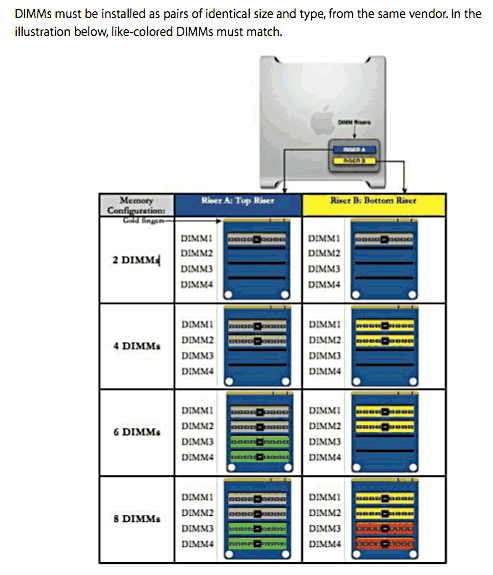
Memory Compatibility Testing and Issues in 2008 Mac Pro
I thought that I would write your site after I solved my own memory woes with my Dual Quad Core 2.8 2008 Mac Pro, I've noticed a few others with my same problem and thought it would help to get the word out!
Situation: I ordered 8GBs of additional RAM for my machine from iRam, I chose 2 sticks of 4GBs each (800 MHz speed). When I installed them and rebooted my Mac Pro (Running 10.6.2) it showed only 10 GBs of ram, yet I should have seen 14 GBs as my machine still had its 'old' ram inside. See below diagram for their configuration in my initial installation attempt:
Note: The Hynix RAM was the RAM supplied by Apple when I first bought the machine (new).
INITIAL INSTALL:
RISER A
Dimm 1: iRam 4GB
Dimm 2: iRam 4GB
Dimm 3: Hynix 1GB
Dimm 4: Hynix 1GB
RISER B
Dimm 1: OWC 2GB
Dimm 2: OWC 2GB
Dimm 3: (empty)
Dimm 4: (empty)
RESULTS: Only 10GB is recognized, both iRam sticks are shown in System Profiler as only 2GB sticks each. (Despite Apple's guide showing the above to be a valid pairing configuration.)
I then started testing to make sure that I wasn't shipped 2GB sticks instead of 4GB sticks (intentionally or otherwise)
TEST 1:
RISER A
Dimm 1: iRam 4GB
Dimm 2: (empty)
Dimm 3: (empty)
Dimm 4: (empty)
RISER B
Dimm 1: iRam 4GB
Dimm 2: (empty)
Dimm 3: (empty)
Dimm 4: (empty)
RESULTS: 8GB, no problems - I know the 4GB sticks are at least the size they claimed to be now
TEST 2:
RISER A
Dimm 1: iRam 4GB
Dimm 2: iRam 4GB
Dimm 3: (empty)
Dimm 4: (empty)
RISER B
Dimm 1: OWC 2GB
Dimm 2: OWC 2GB
Dimm 3: (empty)
Dimm 4: (empty)
RESULTS: 12GB, no problems - I know that they play nicely with OWC when on separate riser cards
TEST 3:
RISER A
Dimm 1: iRam 4GB
Dimm 2: iRam 4GB
Dimm 3: OWC 2GB
Dimm 4: OWC 2GB
RISER B
Dimm 1: Hynix 1GB
Dimm 2: Hynix 1GB
Dimm 3: (empty)
Dimm 4: (empty)
RESULTS: 14GB, no problems - I know that they play nicely with OWC on the same riser card and Apple's Hynix the other
TEST 4:
RISER A
Dimm 1: iRam 4GB
Dimm 2: iRam 4GB
Dimm 3: (empty)
Dimm 4: (empty)
RISER B
Dimm 1: OWC 2GB
Dimm 2: OWC 2GB
Dimm 3: Hynix 1GB
Dimm 4: Hynix 1GB
RESULTS: 14GB, no problems
So, the end result was that the Apple supplied Hynix 1GB 800MHz FB-Dimm modules simply would not allow the iRam 4GB 800MHz FB-Dimm modules to be recognized any higher than 2GB's each when they shared the same riser card. However, when separated by placing them on different risers, regardless of what Dimm Slot #'s they were on, all modules were then recognized at their full size.
I hope this helps people realize that this is occurring - and a way to fix it.
Best, Dylan I.
|
