(PowerPC G4) Mac Mini Mini-Review
Last Updated: 2/4/2005
I ordered the $499 Mac mini just minutes after the Steve Jobs keynote. I
wanted to see just how much Macintosh hardware my $499 would buy, so I
have not yet made any hardware upgrades. The system is a stock 1.25 GHZ,
256 MB, 40 GB, combo drive Mac mini. It arrived from Apple triple boxed,
the retail box was held inside a larger cardboard box by a pair of foam
inserts and then placed inside a still larger box surrounded by an
abundance of packing peanuts.
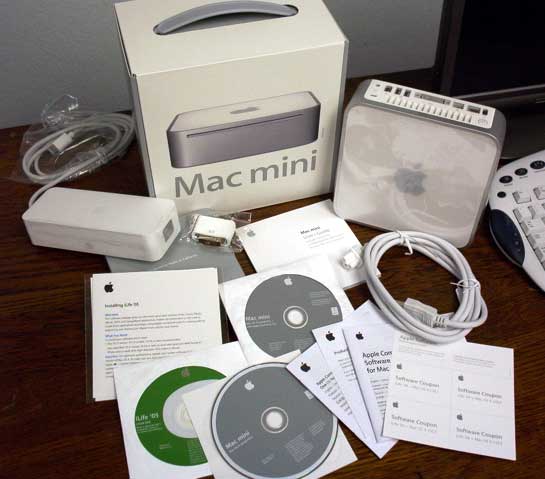
The fit and finish of the Mac mini is incredible. It feels like a high
class piece of engineering. It's surprisingly heavy and sturdy compared to many of the Mini-ITX PCs I have worked with. The included DVI adapter is the best I have ever used, it's very compact yet is very easy to screw into place.
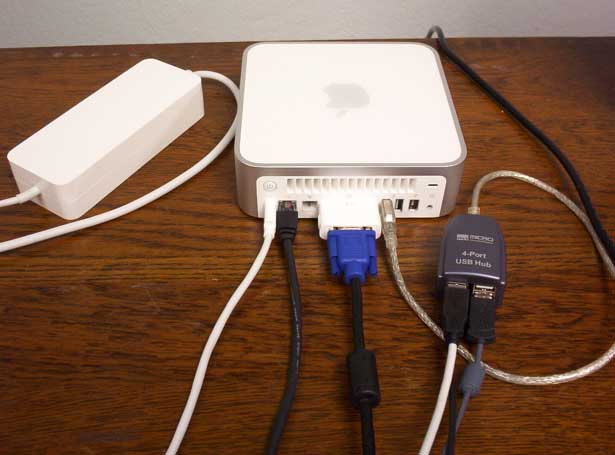
The power supply is larger than I was expecting but easily
disappears on the floor behind my desk. As for noise and heat, I have no
complaints. After several hours of heavy use, the mini is still cool to
the touch and the power supply is only slightly warm. I cannot hear the
hard drive or fan noise over the gentle hum of the air filter in the next room. The slotload combo drive sounds is the only noisy part of the mini and should be a familar sound to PowerBook and iBook users.
I used my existing PC components to set up the Mac mini. The monitor is a 17" NEC LCD that uses an analog VGA input. The mini puts out the best
video signal I have ever seen on that monitor. When running at the native 1280 x 1024 resolution, the image is crisp, bright, and stable. When connected to one of my PCs, the image generally has a much poorer quality. The output from a PCI GeForce MX4000 is slightly blurry, the output from my the onboard graphics of my VIA EPIA M10000 Mini-ITX system is even more blurry and sometimes has poor color saturation, and the onboard video from my Dell Optiplex is the worst as it is blurry and sometimes even flickers and flashes. Apple certainly knows something about producing a high quality analog video signal on a small consumer device!
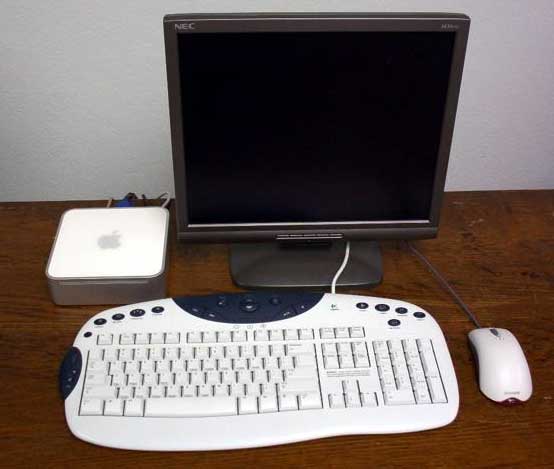
The keyboard I use is a Logitech USB Internet Navigator and the mouse is a
Microsoft USB Optical Wheel Mouse. These peripherals worked perfectly
right away. I have not yet installed the proper drivers, but the scroll
wheels, right mouse button, and volume keys already work fine.
Because this was an early mini, it did not arrive with iLife '05
preinstalled. Out of the box, the system was running 10.3.7 build 7T21.
Installing iLife '05 from the included DVD took 26 minutes. I also
installed iWork '05 which took another 5 minutes. After running Software
Update and rebooting, Get Info reported that 9.61 GB of the hard drive was already consumed. Perhaps the 1.42 GHZ / 80 GB option would be worth the extra $100.
Overall performance feels exactly like my 15" PowerBook G4 (1.25 GHZ, 512MB, Radeon 9600 64MB, 80GB HDD, 2x Superdrive). This makes sense as both use a variation of the PowerPC 7450 CPU on a 167 MHZ bus. Both also use PC2700 / DDR333 RAM. A quick test of the two machines with Xbench showed nearly identical CPU, Thread, and Memory test results. The Radeon 9600 in the PowerBook produced slightly faster Quartz and User Interface results (165.13 vs 160.18, and 217.56 vs 212.38) while the Mac mini's Radeon 9200 actually beat the PowerBook in the OpenGL test with a score of 212.38 vs 217.56.
A comparison of Nanosaur II showed that the PowerBook's Radeon 9600 is
much more powerful than the mini's Radeon 9200 in actual game play. The
graphics looked better and had much smoother motion on the PowerBook. I
was not even able to play the game at high quality or in 32 bit color on
the mini. An email from Pangea explained that the faster Radeon 9600,
increased graphics RAM (64 MB vs 32 MB) and more system RAM (512 MB vs
256 MB) in the PowerBook is why game performance was better. It was also
explained to me that the base Mac mini just barely meets the system
requirements for Nanosaur II, but an upgrade to 512 MB would double the 3D texture quality. I have not been able to test this as my mini is still running on the original 256 MB.
All of the included applications ran great on the stock mini, even iDVD
was very usable, though I was unable to burn a sample disc due to not
having a Superdrive. I was able to play the 9 track "Glide" demo in
GarageBand 2 while browsing the web with Safari and using expose to switch windows. Anything beyond that caused GarageBand to stop playing, but that to me is still very impressive for 256 MB.
This Mac mini is replacing a 1.3 GHZ Pentium 3 (Tualatin) with 512 MB. The mini feels significantly faster than the PC which is running Windows XP. There were a few websites which loaded faster in Internet Explorer 6.0 than with Safari, but by using optimized builds of Camino and Firefox, I was able to bring the mini back up to speed. These can be found at the following URL. Be sure to download the right version for your CPU.
(Links below may not be valid in the future)
http://mbencher.ilnm.com/camino/
http://homepage.mac.com/krmathis/
Microsoft Internet Explorer 5.2.3 is still included with the mini, which
in my opinion is a disservice to new users. At the very least it should
come with a warrning banner. I have seen too many new Mac users ignore
Safari and use IE, only to find themselves battling with its slowness and frequent crashes.
I cannot say enough good things about the Mac mini. It is very difficult
to find fault with this system. More USB ports would have been nice, but I made due with a 4 port USB hub I bought for $9 at OfficeMax. For $499 (or $479 for students and educators) it is an excellent machine. I have found that 256 MB is enough RAM to do most tasks, but seriously consider
ordering it with 512 MB to save yourself frustration a few months from
now.
As a final comparison, the Mac mini is much faster than my 1 GHz VIA EPIA M10000 Mini-ITX PC with its integrated shared ram graphics and VIA C3 processor. That PC benchmarks to about the same performance as a 600 MHz Pentium 3. The Mac mini is also smaller. While most Mini-ITX PCs are about the size of a full size CD-ROM drive or car stereo, the Mac mini is only about half that size, just slightly larger than a stack of 5 CD jewel cases. And finally... the Mac mini is cheaper. Not only does it come with a full suite of software, but it can be had for $499 while a Mini-ITX PC with similar specs will cost about $550, without software.
Have you seen the new Nano-ITX based Nanode? The Mac mini is still smaller and faster, and still makes room for a DVI connector.
(name withheld by request)
Other Mac Mini Related Articles:
See the Mac Models/Upgrades/Mods page.
|
