*SONNET CANNOT ANSWER QUESTIONS ON USING DUETS IN CUBES*
I had gotten an email from Sonnet saying they cannot answer emails with questions on this mod, which I have clearly stated is not warranted or approved by Sonnet since day one. Sonnet asked that I clarify the fact that if you perform the mods below to install a Duet in a Cube, you void the warranty on the upgrade card, since it was not designed to work in a Cube. (Also note you void the warrany on the Cube as well.) The heatsink and fan mods below are not endorsed by Apple or Sonnet of course.
Twice in the past year (2001) I've asked Sonnet if their Duet Dual G4/500 CPU upgrade for G4 Towers would work in a G4 Cube. (I asked again after the recent posting of the Dual G4/450 Cube modification page that used an Apple dual G4 module, and was told that it wouldn't, based on comments from Engineering.) As noted below, Sonnet of course didn't design the Duet module for the Cube, so they can't officially recommend (or warranty) it for use in the Cube. However a reader sent info that he's running a Duet in his Cube (as am I). Note he's using an 80mm fan to help cool the heatsink as did the previous dual G4/450 mod article. (The Cube includes mounting brackets for a 80mm fan in the bottom of the case - some sources say this was due to the fact there was a dual G4 Cube option considered by Apple at one time. In fact there's a 12V supply connector inside but the 2 pin connector is so small it's not easy to find the mating connector for the fan wiring. I simply spliced the 12v/GND wires into the existing Hard Drive power connector by removing it's backshell.)-Mike
"Hi, I've been reading your site for over a year, ever since I was a hardcore PC user and now a hardcore Mac user and I just wanted to say how much I enjoy and appreciate the articles here.
After reading about Flemming's exploits, [Dual G4 Cube article] I decided to give it a try, however, having much difficulty finding the appropriate Dual G4 upgrade card, I decided to try the Sonnet Encore/ST G4 Duet 500x2 upgrade card for the PowerMac G4 AGP Graphics and Gigabit Ethernet models in my G4 450 Cube. I purchased the card from www.buy.com for $634.95 with free shipping. It came with a heatsink adapter for the Powermac G4 towers which I used to provide contact to the Cube's heatsink. I pried off the plate [?] for the original CPU card (insert a screwdriver under the clips) and placed the adapter directly onto the heatsink. It had to be placed a little off from the original plate to make sure that it was in contact with the 2 processors on the card and wasn't covering any of the screw holes.
The adapter comes precoated with some sort of thermal conductive paste which keeps it in place, and I used Arctic Silver II on the processors. The only problem is that the adapter is a little too thick (~5mm) and so when put it back together, I couldn't screw all the screws completely down. It's a tight fit, but the Cube will fit back into it's case and runs great. Haven't formally benchmarked it, but my iTunes encodes have gone from 7x to 14.4x and I've gotten faster framerates on Return to
Wolfenstein.
I also installed an Enermax 80mm variable speed fan which I bought from www.bestbyte.net for $9.99. The fan comes with a potentiometer on a separate wire, which I mounted on the inside of the cube, along the top, so I could easily adjust the speed while the cube was running. At its lowest setting (1000rpm) it's practically inaudible, and if it get's really hot, I can turn it all the way up to 3000rpm and have it blowing. I've been keeping it on the lowest setting and I've been running at ~45-55's C.
I attached a snapshot of my Apple system profile. [OS X] Sorry I couldn't get any pics of the installation, but if anyone really wants some I can try and take some.
I just wanted to share my experience with the Sonnet card. Thanks for all the great work on the site,
drtung"
I asked if he could send photos, etc. and he wrote:
"Hey Mike,
I went ahead and replaced the Sonnet Heatsink adapter with the original using 2 aluminum plates.
[Note: I tried 2mm high plates and they were not tall enough - the 2nd CPU on the Duet was hitting the center ridge on the stock heatsink. Another reader also sent a note that
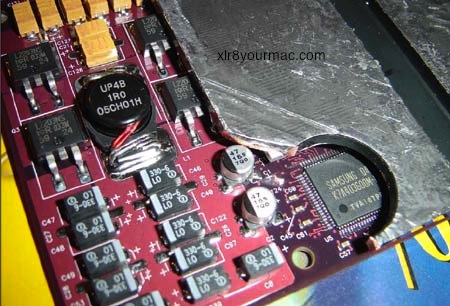
he had to cut a corner off the stock heatsink plate to clear a capacitor on the
Duet card. (See this image showing the cut/capacitor clearance issue.) This may not be needed if the plates are thicker, but just a FYI on something to check for if you're considering this mod. I've personally installed the Duet in my Cube using the Sonnet supplied (Tower model) heatsink adapter, but that required some tweaks. I've made notes and took photos of the process but have been too swamped in other work to write-up the article however.-Mike]
I've attached several pictures of the process that are numbered in chronological order. I also took some comparison shots of the CPU cards so you could see the difference in thicknesses. Ask me if you have any questions.
Thanks, Tung
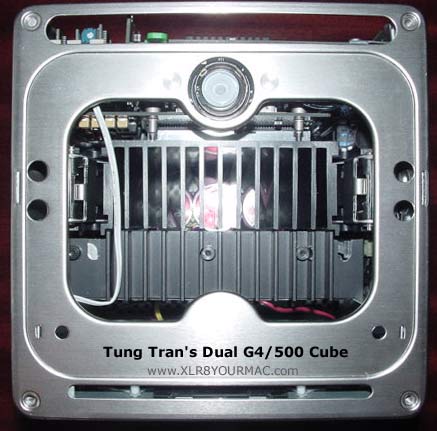
View with Case Off
This is the cube without the case. You can see the fan at the bottom and the wire leading to the potentiometer between the RAM slots.
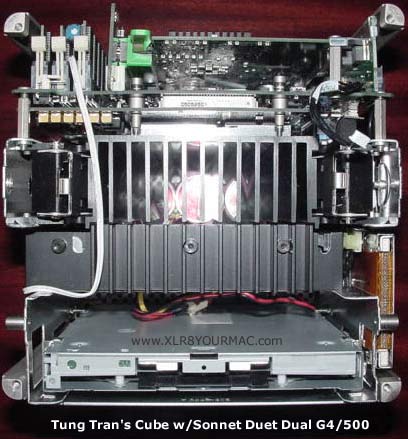
Top View with Cover Off
This is with the top plate off. You can see the thick aluminum heatsink adapter and notice how the screws are just partly screwed in.
(This photo is with the Sonnet Duet Heatsink Adapter in place.)
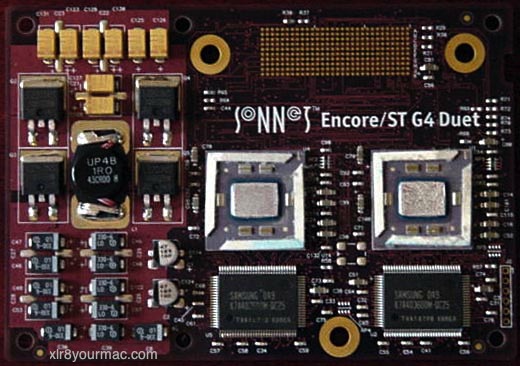
Sonnet Duet Dual CPU module
This is the Sonnett Upgrade card. Notice how they've replaced the parts on the left hand side compared with the picture on Sonnet's
webpage. [The original Duet photos showed large/tall metal can capacitors on the board.-Mike]
I didn't have to make any modifications for clearance since it fits perfectly.

Comparing CPU Module Component Heights
The original [CPU module] is on the left, the Sonnet is on the right.
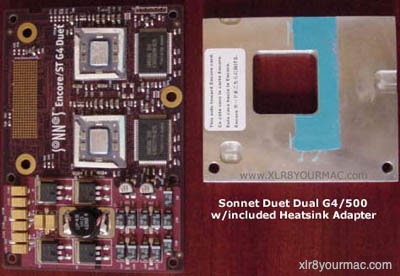
Sonnet Duet and Heatsink Adapter
This is the sonnet card and the heatsink adapter.
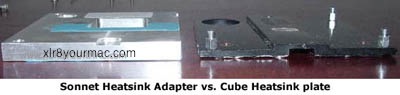
Sonnet vs Cube Heatsink Plates
The Sonnet heatsink adapter is on the left and the original is on the right. [Note: due to thickness of the Sonnet adapter it was not used in his final mods. Instead he modified the original heatsink plate for contact with both CPUs on the Duet. I used the sonnet heatsink adapter in my conversion with some minor CPU module mounting hardware mods.-Mike]
These are the rest of the pictures.
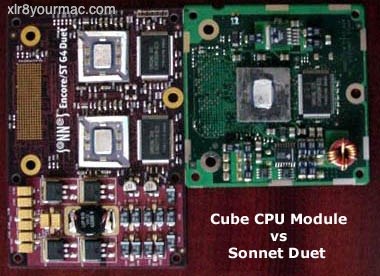
Sonnet Duet vs Cube CPU Module
The Sonnet Dual CPU card vs. the original Cube CPU.
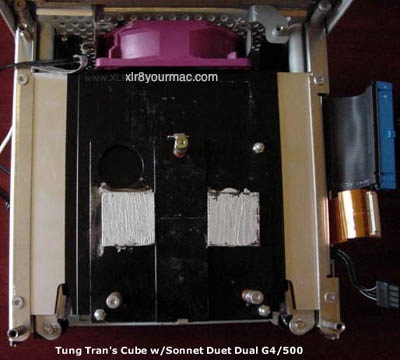
View of Heatsink Mods and Fan
The aluminum plates with the original heatsink adapter. [Note - 2mm thick plates are *not* thick enough. I made two 2mm x 20mm plates and the Duet 2nd CPU contacted the center raised area of the original Heatsink adapter. I assume 3mm (or thicker) plates are required. Also the Duet card showed a "bowing" in the center with the retaining clips attached. I ended up using the Duet's heatsink adapter with some mods like removing the barrel spacers from the CPU module retaining screws.-Mike]
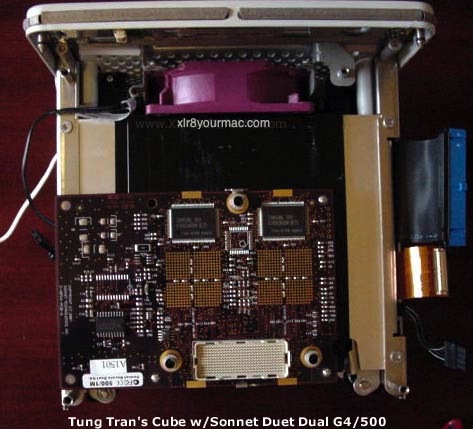
Duet Card Installed
The Sonnet card in place. You can also see the Enermax fan at the base of the Cube.
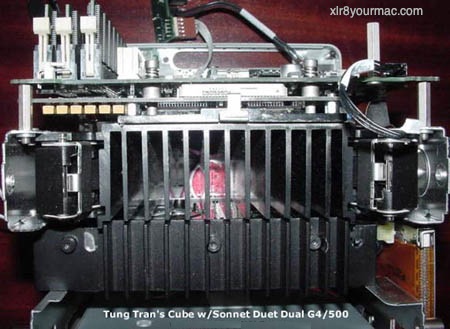
Side View with Sonnet Duet Installed
Above photo shows the Sonnet Duet card and motherboard in place. Now there's no gap and the screws go all the way down.
As for the Cube, it's been running solidly ever since and I have yet to shut it off. I used it to encode some movies into DIVX for ~3 hours solid and it didn't get above 55°C. I think the processors are pretty much stable and FAST.
I also installed an Apple Geforce 2 MX (I need the ADC for my 15" Studio display) and that's been running fine, but it puts out an awful lot of heat. Only the video card's heatsink gets hot, not the CPU heatsink. Do you know of anything like that or know of anyone's experienced that?
-Tung
"
I'm not sure if there's space to put a fan on the stock heatsink, but there are companies that make fan cooled low-profile heatsinks like Tennmax. A Tennmax low-profile cooler was used in the Stealth Voodoo3 cooler review and I've used a stock Geforce2 MX in a Cube OK (Dual G4/500 using Sonnet Duet and another using OEM Apple Dual G4/450 module) but later replaced it with a Mac Geforce 3 card. The Cube's VRM board is one area of concern with higher system power draw and heat.-Mike
Other Apple Cube Upgrades and Articles:
The Mac Mods/Upgrades page has articles on Mac Pros, Mac mini, iMac, Macbook Pro, and PowerMac G5.
|